A Squarespace plugin

The Add to Calendar button Squarespace should have built.

Add a beautiful, brand-matched calendar button to any page, right in the Squarespace editor. Run Events pages too? Every event gets one automatically, with full details in every invite.

One-time price. Works with Squarespace 7.1 · Google, Apple, Outlook, Office 365, Yahoo & .ics
One-time price, no subscription 30-day money-back guarantee Built by a Squarespace design studio No coding skills needed

Squarespace doesn't have a real Add to Calendar button — so you're stuck pasting in a code snippet that half-works, paying too much for a clunky monthly platform, or losing guests who never save the date. CalButton fixes that, right inside your editor.

Two ways to use it

One plugin, two jobs.

Put a calendar button exactly where you want one — and let your Events pages take care of themselves.

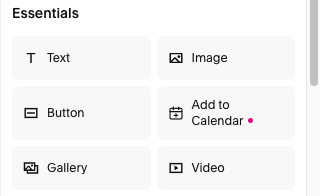
“Add to Calendar” in the Squarespace Add Block menu
1

Drop a button on any page

From the Squarespace Add Block menu, add an Add to Calendar button to any page on your site. Fill out a short form, click Create button, and it lands on your page — just like any other button, styled like your site.

No Events page required.
A Squarespace calendar page with a branded Add to Calendar link on the event
Calendar page
A Squarespace event page with a branded Add to Calendar button and full details
Event page
2

Your calendar & events pages

Already run a Squarespace Events page? CalButton reads every event and replaces the bare native export links on your calendar and events pages with a branded button automatically.

Includes all your description info & a link back.
Why CalButton

Yours, down to the details.

Squarespace Site Styles Buttons panel showing the site's saved button design
No. 1

Wears your brand

Buttons use your site's own saved button designs, fonts, and section color themes automatically. Redesign your site next year and every calendar button updates itself.

Calendar menu with the real brand logos
Brand logos
Calendar menu tinted to your theme color
Theme color
Calendar menu with minimal marks
Minimal
No. 2

Customize it

Offer any of six services — Google, Apple, Outlook, Office 365, Yahoo, or an .ics download — as a dropdown or a row, styled as your site's buttons or text links. Rename it to anything.

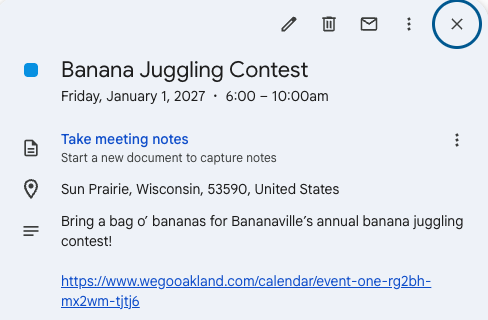
A Google Calendar event showing the full title, time, location, description, and a link back to the event page
No. 3

The whole invite arrives

Title, timezone-correct times, location, description, and a link back to your page — all delivered straight into your guest's calendar.

You'll spend longer reading this than setting it up.

Copy-paste one line of code and you're done.

01

Paste one line

Drop the <script> tag into Code Injection.

02

Click the + like always

“Add to Calendar” is now in your Add Block menu. Fill in the event, pick a style, watch the live preview.

03

Create button ✨

It places itself on the page, styled like your site. Your Events pages? Already buttoned automatically.

The honest comparison

Pay once what the others charge every month.

CalButtonAddEventSquarespace native
Price$49 once$29–99 / monthFree
Cost over 3 years$49$1,044+Free
Add to Calendar button on any pageYes — from the Add Block menuYes — paste an embedNo — doesn't exist
Automatic buttons on Events pagesYes — brandedNoBare export links only
Matches your site's designAutomaticManual themingUnstyled links
Full details in the inviteAlwaysYesNo description or linkback
Account or external dashboardNone neededRequired
Click limits / meteringNone, everMetered per click

AddEvent also has a free tier for personal, non-commercial use (100 add-to-calendar clicks a month); prices shown are their commercial plans. Three-year figures assume a continuous subscription.

Pricing

Buy once. Yours forever.

AddEvent charges more than this every single month. CalButton is yours for good.

Single site

$49 USD
One-time · 1 website
  • One Squarespace 7.1 site
  • In-editor builder + automatic Events buttons
  • All six calendar services, unlimited clicks
  • Free updates & fixes
Get CalButton
For designers

Designer

$149 USD
One-time · up to 10 sites
  • Install on up to 10 client sites
  • Everything in Single site
  • Priority email support
  • Early access + a say in the roadmap
Get the designer license
For agencies

Agency

$249 USD
One-time · up to 25 sites
  • Install on up to 25 client sites
  • Everything in Single site
  • Priority email support
  • Early access + a say in the roadmap
Get the agency license
30-day money-back guarantee · Install help included · Squarespace 7.1
Questions

Fair questions, straight answers.

Do I need to know how to code?
Not at all! You paste one line of code that we provide into the Code Injection area of your Squarespace site when you install (we show you exactly where — it's super simple). After that, everything happens inside the normal Squarespace editor: the Add Block menu, a friendly form, a Create button. Your Events pages get buttons with no setup at all.
What Squarespace plan do I need?
CalButton installs through Squarespace's Code Injection (the header/footer code area), so you'll need a plan that includes it. On current Squarespace pricing that's the Core plan or higher (Core, Plus, or Advanced); on older legacy plans, it's Business or above. The Personal plan doesn't include Code Injection, so CalButton can't run there. You can check which plan you're on in your Squarespace billing settings.
Can I add a button to a regular page, not just Events pages?
Absolutely! That's actually why we initially created CalButton. From the Add Block menu you can drop an Add to Calendar button anywhere on any page: a save-the-date on your home page, a class, a webinar, a product launch, a fundraiser. You don't need a Squarespace Events page at all. And if you do have one, its events get buttoned automatically too.
Which calendars does it support?
Google Calendar, Apple Calendar, Outlook.com, Office 365, Yahoo Calendar, and a universal .ics download that works with everything else. You choose which ones to offer on each button.
Will the buttons match my site's design?
Yes! Buttons use your site's saved button designs (Primary, Secondary, Tertiary) or your theme's text-link style, and they adapt to each section's color theme. Change your site design later and the buttons follow automatically.
What happens on my Events pages?
CalButton finds Squarespace's built-in export links — the bare “Google Calendar · ICS” text — and replaces them. On the calendar page it uses a styled link that matches your branding; on each event page, a button styled to your site's primary button and that section's color theme. These aren't just more prominent and more on-brand — they also carry your event's full details. It all happens automatically, and it follows Squarespace's own “Show Export Links” setting: turn that off and everything disappears, no code needed.
Where does the event description come from?
From each event's own settings. In Squarespace, every event has its own Event settings with an Excerpt field, and whatever you write there is what CalButton adds to the calendar invite — not the body content shown on the event page. So the excerpt is where you write exactly what you want guests to see in their calendar. (If you leave it blank, we fall back to the event's page text so the invite still carries details.)
Do my visitors need an account? Do I?
Your visitors never need an account — the calendar links are generated right in their browser. You don't create one either: you buy CalButton with your email, get a license key, and paste it into your Squarespace footer — that's the whole setup. The plugin runs entirely inside your own site, so there's nothing to log into to keep your buttons working. And there are no click limits or metering, ever.
Does it work with timezones / all-day events?
Yes. Every link is generated timezone-correct (with proper DST handling), and all-day events use true date-only entries so they never bleed across days. Events-page buttons are built from Squarespace's exact stored times, so they stay correct across timezones.
Which Squarespace versions?
Squarespace 7.1 — the current platform. Both the in-editor builder and automatic Events buttons are built for and tested against 7.1.
Your next event deserves a real button.

Install it in 10 seconds. Every event, class, and launch on your site — buttoned, branded, and one click from your guests' calendars.

Get CalButton — $49, once